
The NTK authoring system runs as a stand-alone application on a computer working in combination with CircuitPython firmware running on the microcontroller device. To get started, install the NTK software on your computer and microcontroller (e.g. Arduino or ESP32). Before you proceed, be sure to visit our hardware recommendations page to help decide which device and expansion board to use.
- Download the lastest NTK software: https://www.netlabtoolkit.org/download/
- The current Mac build of NTK is for Apple Silicon Macs only (no Intel) or Windows.
- Once the .zip file has downloaded, you can uncompress it and see the following files
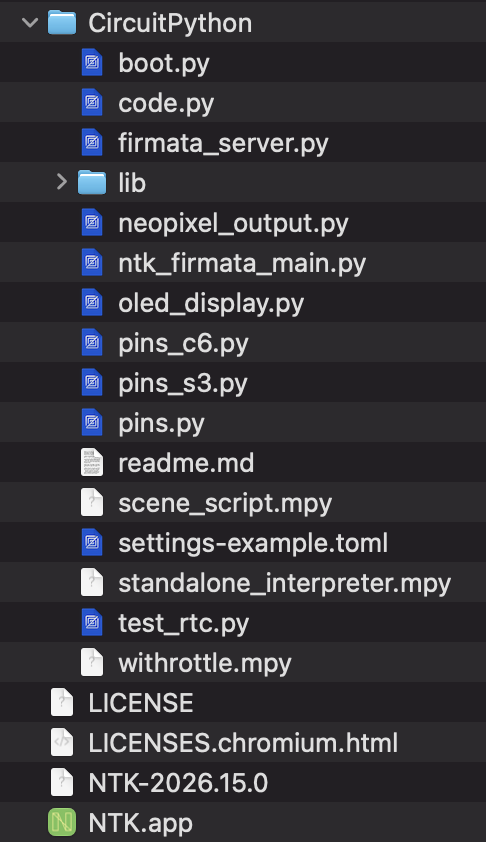
- Computer – Move NTK.app or NTK.exe to your Applications directory
- Arduino: using the Arduino IDE, upload Examples>Firmata>StandardFirmata to your device and leave it connected to your computer by USB. Note: some features in the full NTK that run on modern ESP32 microcontrollers only and will not run on a standard Arduino.
- WiFi CircuitPython enabled device like the Seeed XIAO ESP32 c3 do the following to install CircuitPython:
- Option A (Web Serial): Open a Chromium-based browser (like Chrome or Edge), navigate to a tool supporting Web Serial ESPTool. You can access it in Chrome from the Seeed XIAO ESP32 c6 CircuitPython page by clicking on the OPEN INSTALLER button. Then click on the Full CircuitPython install link, then next, then CONNECT to access your device and select the port from the list like cu.usbmodem101. then NEXT and continue to erase the clash.

- Option B (Command Line): Install
esptoolvia Python (pip install esptool), then run the flash command (adjustingCOMXXor/dev/ttyUSBXto your port):esptool --port COMXX write_flash 0x0 path_to_firmware.binfor example, we usedesptool --port /dev/tty.usbmodem101 write_flash 0x0 adafruit-circuitpython-seeed_xiao_esp32c6-en_US-10.3.0.bin
Download the current version of CircuitPython for the device. Because the C6 does not support the CIRCUITPY drive, you can flash the.binfile using either command line or a browser:
- Once CircuitPython is installed on your microcontroller, upload the NTK CircuitPython files to your device using Thonny or the CIRCUITPY drive. These include code.py, firmata_server.py, pins.py, and standalone_interpreter.mpy. In addition, you’ll need to include the needed library files that are in the lib directory in the download. These should go in the /lib directory on your device.
- Option A (Web Serial): Open a Chromium-based browser (like Chrome or Edge), navigate to a tool supporting Web Serial ESPTool. You can access it in Chrome from the Seeed XIAO ESP32 c6 CircuitPython page by clicking on the OPEN INSTALLER button. Then click on the Full CircuitPython install link, then next, then CONNECT to access your device and select the port from the list like cu.usbmodem101. then NEXT and continue to erase the clash.